Software > 3D CPU Meter
Screen Shot
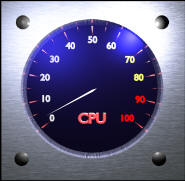
This is 3D CPU Meter.
Please note that this meter looks 3D graphics, but it's just
2D application. So, you can't rotate the meter :-).
Information
[Title]
3D CPU Meter
[Installation]
Double Click the CPUMeterSetup.msi, then the installation
wizard will come up. Please follow the instructions.
[Uninstallation]
From "Start"->"Control Panel"->"Add/Remove", remove "3D CPU
Meter".
This application does not use "Registry", but uses
configuration file under
\Documents and
Settings\UserName\Application Data\Uchukamen\3D CPU Meter.
Please remove the configuration file "CPUMeter.conf" manually.
[Menu]
Right click on the meter to display context menu.
- Always Top
This application always stay on Top.
- Save Location
Save current window location and size.
- About
Shows version number.
- Exit
Exit.
- Move window
Press left mouse button and drag to move window.
-Resize window
Locate mouse to each corner and the cursor will change for resizing.
Press left mouse button and drag to resize.
Note: Maximum Windows size is limited up to 300 x 300.
[Supported OS]
Windows XP/2000 Server/2003 Server
[Required Libraries, etc.]
.NET Framework 1.1
[Category]
Free Software
[Support]
Please send me feedbacks.
Version Information
| Date |
Version |
Description |
| 2005/6/19 |
2.0.1996.41211 |
Ver.2.0 Released |
Download
I have been trying to create more good looking application,
but as far as I use the Microsoft controls bundled with Visual
Studio 2003, I have no choice. So, I've decided to create DirectX
based application, but as you know it very complicated to create
real 3D applications.
I took a look at DirectX sample code in the DirectX SDK. And I
found some DirectX based applications are quite easy. But if you
need to create your own 3D objects, you need 3D modeling software. I
found a free 3D modeling software "BLENDER".
http://www.blender3d.org/cms/Home.2.0.html
Blender has very unique mouse and keyboard operations, and it
took almost two weeks to learn how to use the BLENDER. While I was
struggling with "Blender", I found I don't have to create real
DirectX application if I just need 3D LOOKING!
That's why I created this application, 3D "Like" CPU Meter. It
has a 3D like background picture and the meter hand drawn by GDI+.
This is not a DirectX based application, but this could be a good
example of 3D looking 2D application :-).